Where to start
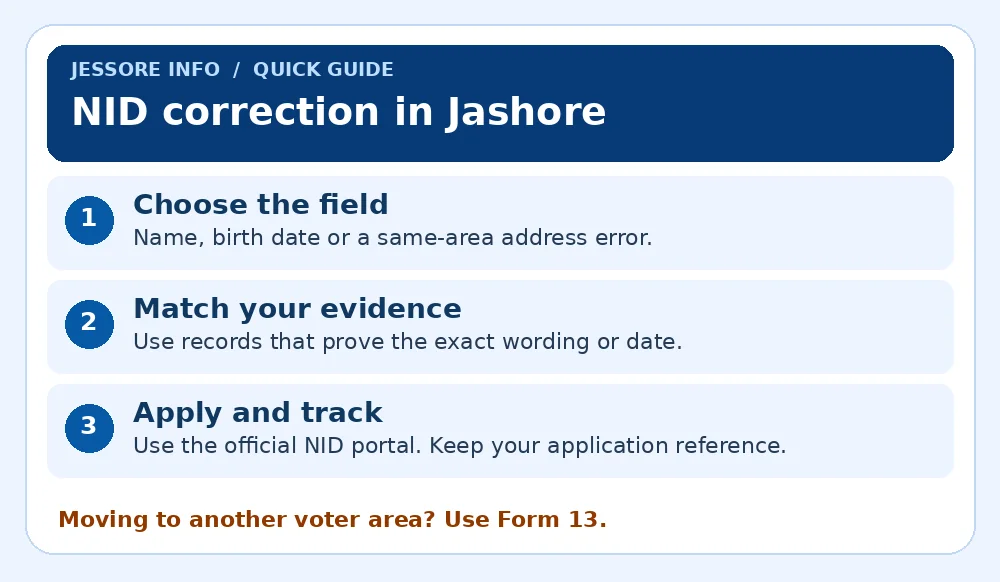
For NID correction in Jashore, start with the exact field that is wrong and gather records that support the change. Use the Bangladesh NID Application System for the ordinary correction process. Contact the election office if the records conflict or a different procedure applies.
Name or birth date
Compare the NID with the records that support the correct spelling or date.
Address spelling
Use ordinary correction for a spelling or address-detail error within the same voter area.
Moved to a new voter area
Use the voter migration route through the election office serving your current residence.
Which step applies to you?
| Your situation | Next step |
|---|---|
| Your name differs by a letter | Gather official evidence showing the full correct spelling, and check if the error is in Bangla, English or both. |
| Your date of birth differs | Compare the full dates across your supporting documents and ask the office about contradictory evidence. |
| House, street or post office is wrong | Gather evidence of the accurate address and confirm that your voter area stays the same. |
| Your photograph needs changing | Ask the NID office how to attend in person, as the official FAQ describes a separate process. |
Step-by-step guide
Make a field-by-field comparison
Write down the existing entry, the requested entry and the document that supports it. For example, compare the English spelling on your NID with your passport and educational certificate. A clear request makes it easier to explain whether a letter, word or entire name is changing.
Read the official evidence guide
The NID FAQ lists examples such as SSC or equivalent certificates, birth certificates and passports for name-related corrections. Address evidence can include certain property or utility records. Which records are relevant depends on the field and the nature of the correction.
Prepare files and protect your account
Scan complete pages so the name, date and issuing authority are readable. Follow the portal’s account-verification instructions and upload the required evidence there. Keep originals accessible in case the office requests verification.
Submit and keep a reference
Review the requested change and check the fee through the portal for the relevant application type. Keep the application reference, receipt and a copy of what you submitted. Record the date and read any follow-up instructions in full.
Review the corrected record
After approval, check every field you asked to change in both languages where applicable. Keep the updated record and ask any institution that relies on the old version how to update its own file.
Example
Your NID shows “Rahman” in English but your educational and passport records show “Rahaman”. List the current spelling, requested spelling and evidence in one place. If one supporting record uses a third spelling, ask the election office which evidence it needs before you submit the application.
Common problems and how to resolve them
You cannot verify the online account
Use the official account support instructions. Keep your registered contact available and ask the election office what to take if you need in-person help.
The office asks for more evidence
Read the request to identify the exact disputed field. Prepare evidence for that field and check how the office wants it submitted against the existing reference.
Frequently asked questions
Can I use a birth certificate as evidence?
The official FAQ lists a birth certificate among examples for some corrections. Check the list and requirements for the specific field you are changing.
Can I fix an address typo after moving?
Separate the address typo from a change of voter area. Ask the office handling the transfer what should be corrected first if both issues apply.
Is a lost card the same as a correction?
The portal offers a reissue route for a lost card. Compare that service with correction if your record also has an error.
Official sources and related Jashore guides
Official guidance checked on 16 November 2026.