
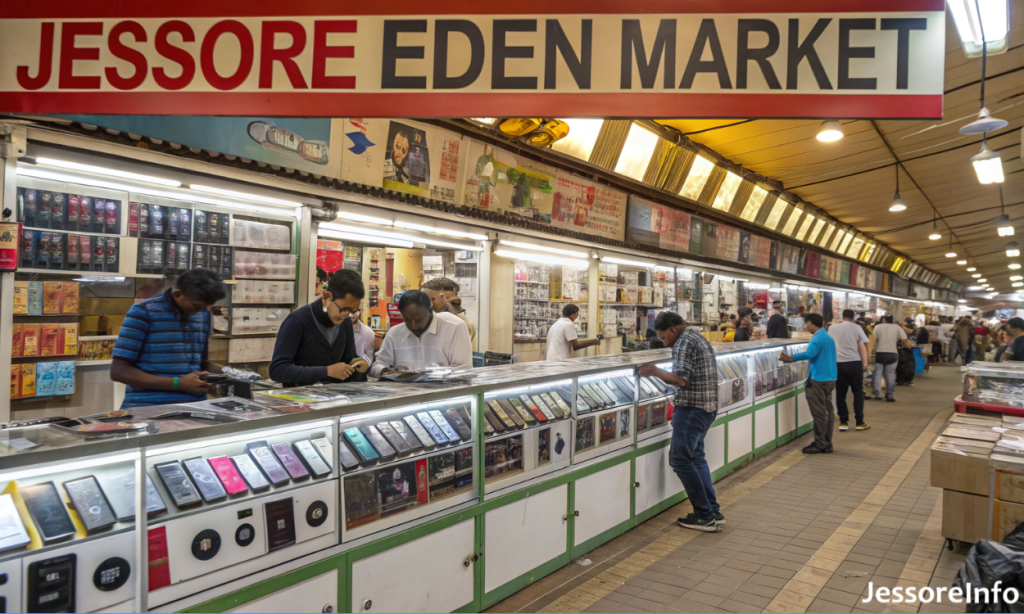
Jessore Eden Market: Location, Mobile Shops and Shopping Guide
Jessore Eden Market
Eden Market is a commercial market on Mistrikhana Road, also written as M.K. Road, in Jashore Sadar. Verified establishment and dealer records show that the market is particularly relevant for mobile phones, accessories, electronics and related servicing.
Where Is Jessore Eden Market?
Eden Market is located on Mistrikhana Road in Jashore Sadar. Some establishment and authorised-dealer records write the location as 40 M.K. Road, Eden Market, Jashore. These descriptions refer to the same central market location.
Visitors can reach the market by rickshaw, auto-rickshaw or other local transport from central Jashore. Mention “Eden Market, Mistrikhana Road” or use the Google Maps link above.
What Can You Buy at Eden Market?
Government establishment records verify the presence of businesses engaged in mobile-phone sales, mobile accessories and servicing at Eden Market. Current dealer records also identify electronics and mobile-related businesses in the building.
Visitors are therefore most likely to use the market for:
- Mobile phones and related enquiries
- Phone covers, screen protectors, cables and chargers
- Earphones and other mobile accessories
- Mobile-phone repair and servicing
- Selected electronics and technology products
- Banking services at the Pubali Bank branch or related facility
Before Buying a Mobile Phone
- Confirm the exact model. Match the model name, storage, colour and regional variant with the box and invoice.
- Compare prices. Ask more than one shop for the final price and confirm whether the handset is official, unofficial, new, used or refurbished.
- Check every IMEI. Dual-SIM phones normally have more than one IMEI. Dial *#06# and compare the numbers with the box and invoice.
- Verify the handset through NEIR. Use only BTRC's official NEIR website or the current official verification method.
- Test the device. Check the display, cameras, speakers, microphone, charging port, buttons, SIM detection, Wi-Fi and mobile network.
- Request a proper receipt. The receipt should state the seller, purchase date, handset model, IMEI, price and warranty terms.
Official, Unofficial, Used and Refurbished Phones
| Phone type | What to confirm | Main risk |
|---|---|---|
| Official new phone | Brand warranty, sealed condition, invoice and IMEI | Warranty may not apply if the seller is unauthorised |
| Unofficial phone | NEIR status, seller warranty and import status | Limited warranty or registration complications |
| Used phone | Ownership, IMEI status, repair history and battery condition | Hidden damage, account locks or a blocked device |
| Refurbished phone | Replaced components, grading and written warranty | Non-original parts or unclear previous condition |
Buying Accessories Safely
- Check that a charger supports the correct voltage and charging standard.
- Avoid damaged, loose or unusually hot charging accessories.
- Test earphones, cables and power banks before leaving when possible.
- Ask whether an accessory has a replacement or checking warranty.
- Keep the packaging and receipt until the checking period ends.
- Do not rely only on packaging claims such as “original” or “fast charging.”
Mobile Repair and Data-Privacy Checklist
Before leaving a phone for repair, protect your accounts and personal information. A technician may need access for testing, but unrestricted access should not be given automatically.
- Back up important photos, contacts and documents.
- Remove the SIM card and memory card unless they are needed for testing.
- Sign out of sensitive financial or work applications when practical.
- Record the phone's IMEI, physical condition and accessories submitted.
- Ask for a written job sheet describing the fault and estimated charge.
- Confirm whether original or third-party replacement parts will be used.
- Do not share banking PINs, mobile-finance PINs or one-time passwords.
- Test the repaired device before making the final payment.
Market Phone Number and Opening Hours
A reliable current market-management phone number or market-wide opening schedule was not found. Individual shops may maintain different business hours and weekly closing arrangements.
If you need a particular shop or service, contact that business directly. Visiting during normal daytime commercial hours may be more practical, but this is not a guarantee that every shop will be open.
Practical Shopping Tips
- Compare the same model or accessory at multiple shops.
- Ask for the complete price before agreeing to a purchase or repair.
- Read the warranty conditions instead of relying on verbal promises.
- Inspect products and count returned cash before leaving.
- Keep receipts, warranty cards and repair documents safely.
- For an expensive purchase, avoid making a rushed decision.
Frequently Asked Questions
Where is Eden Market in Jessore?
Eden Market is on Mistrikhana Road, also written as M.K. Road, in Jashore Sadar. The commonly published postal area is Jashore 7400.
What is Eden Market known for?
Verified establishment records show mobile-phone, accessory, servicing and electronics-related businesses at the market. It is therefore a useful destination for mobile and technology shopping.
Is Pubali Bank located at Eden Market?
Pubali Bank's current official listing identifies its Jashore Branch and related banking facility in the Eden Market building on Mistrikhana Road.
What are Eden Market's opening hours?
No reliable market-wide current schedule was found. Individual shops may have different hours and closing days.
Does Eden Market have an official phone number?
A verified current market-management number was not found. Contact the specific shop, bank or service provider you intend to visit.
How do I check whether a mobile phone is registered?
Use BTRC's official NEIR website. You can find the IMEI by dialling *#06# and should check every IMEI on a multi-SIM handset.
Should I collect a receipt when buying a phone?
Yes. Keep an invoice showing the seller, date, model, IMEI, price and warranty conditions. BTRC also advises buyers to retain the purchase receipt.
Can I get a phone repaired at Eden Market?
DIFE records confirm mobile-servicing businesses at Eden Market. Availability, parts, repair cost and warranty should be checked with the selected shop.
Verification sources
Information reviewed: 29 October 2026. Shop names, stock, prices, opening hours, warranties and available services can change. Confirm time-sensitive details with the selected business before travelling or making a purchase.